Pump Keeper Text Alerts
SMS program details and how to opt in.
The opt-in form
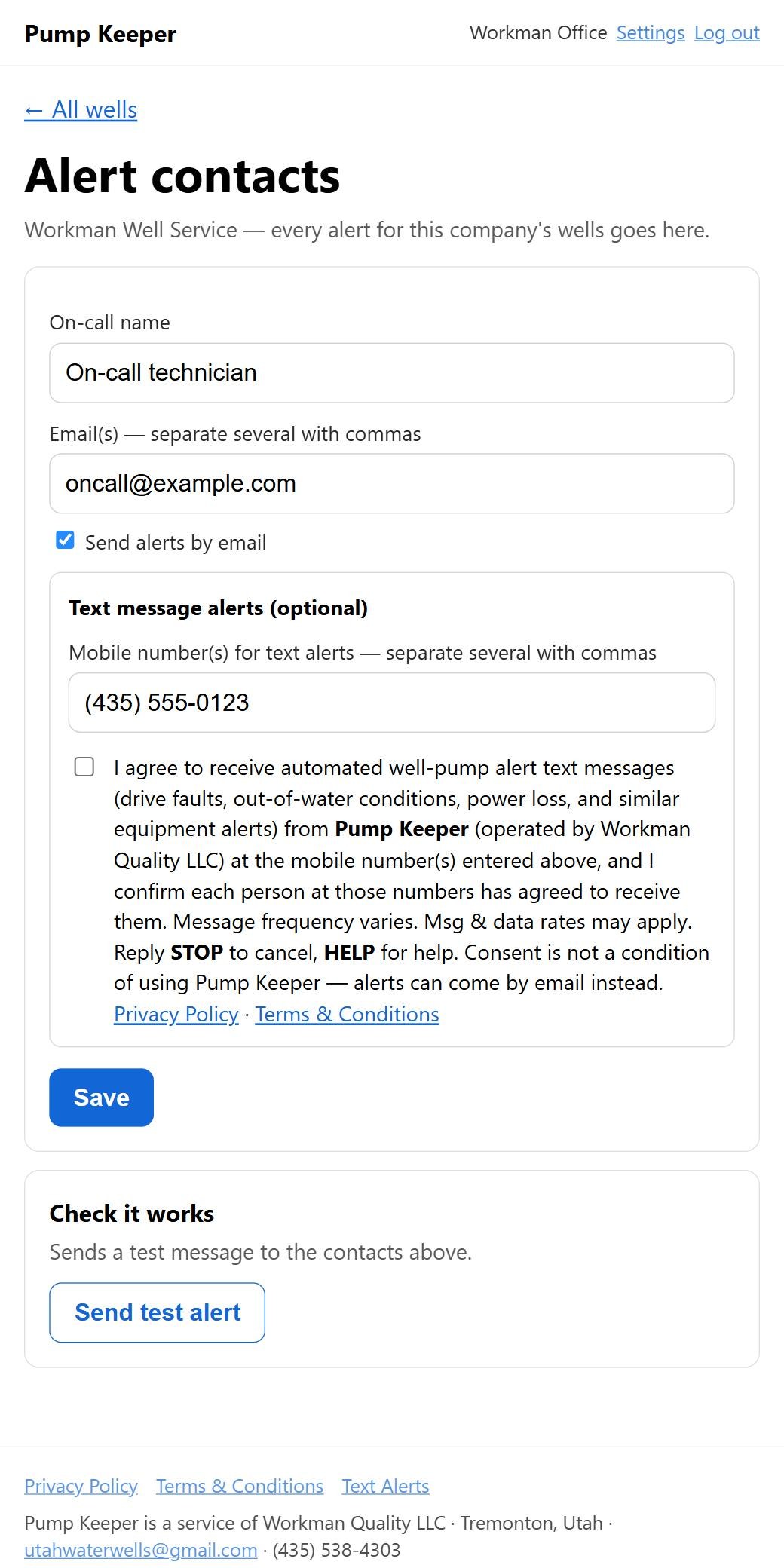
This is the text-alert sign-up form exactly as company administrators see it in Settings → Alert contacts after signing in (that page requires a login, so this public copy is provided for review — it does not submit anything). The mobile number field and the consent checkbox are on the same form, and the checkbox is unchecked by default.
About the program
Program name: Pump Keeper Well Alerts
Sent by: Pump Keeper, a service of Workman Quality LLC (Tremonton, Utah)
Who receives texts: on-call technicians and staff of water-well service companies
that use Pump Keeper to monitor their customers' wells. These are business alerts; Pump
Keeper does not send marketing or promotional texts.
What the texts are about: automated alerts about monitored well pumps — drive faults, out-of-water (dry-well) conditions, loss of power at the well, pumps short-cycling or running far longer than normal, and monitors that stop checking in — plus a notice when a problem clears.
Example message:
https://pumpkeeper.app/sites/12
Reply STOP to opt out.
How to opt in
- An administrator of the service company signs in to their Pump Keeper account and opens Settings → Alert contacts.
- In the Text message alerts (optional) section of that form, they enter the mobile number(s) of the on-call staff who should receive alerts. The phone-number field and the consent checkbox are together in the same section.
- Directly below the phone-number field, they tick the optional consent checkbox, which is unchecked by default (see the form above for its exact wording).
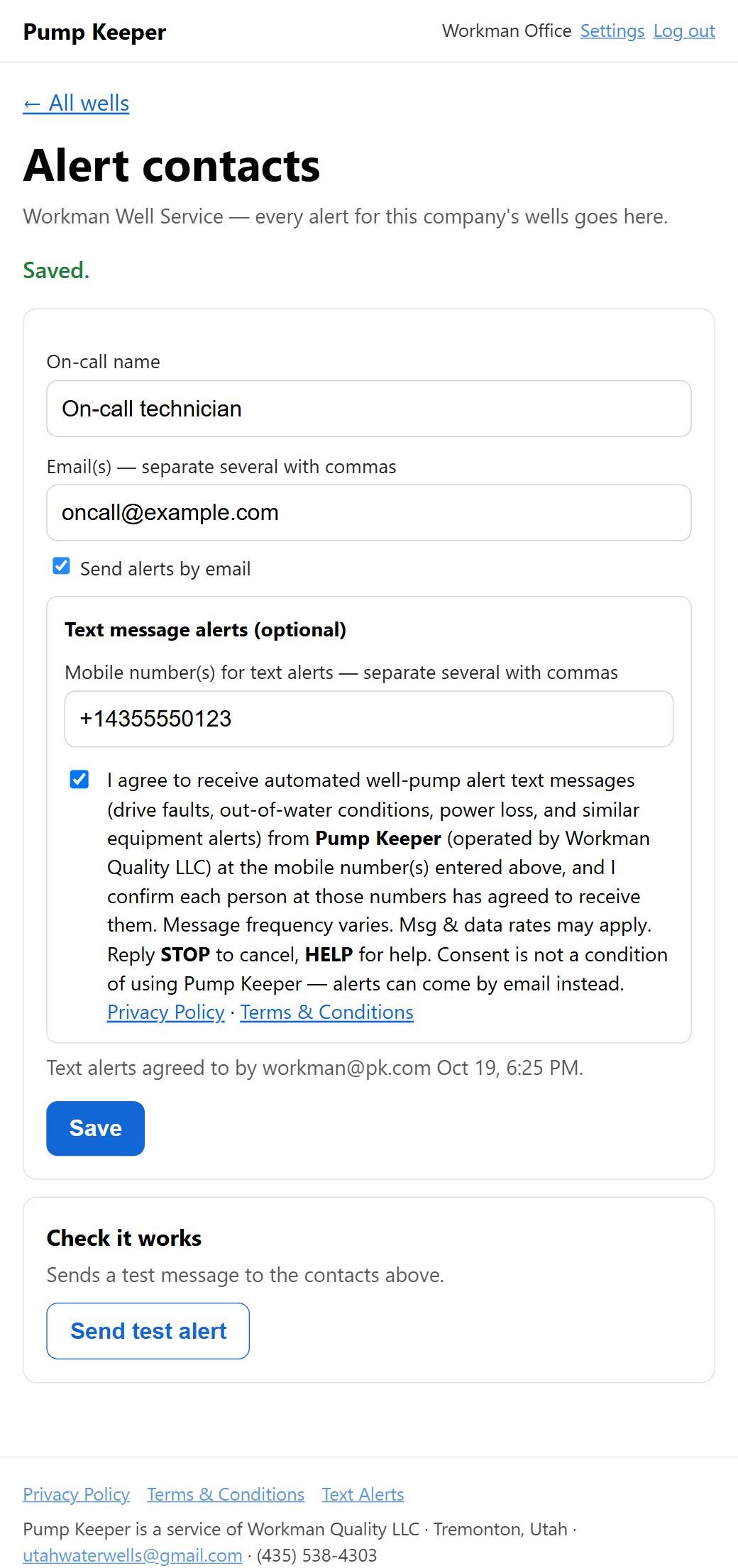
- They click Save. Leaving the box unticked is fine — alerts then go by email only.
- Each newly added number receives this confirmation text:
Pump Keeper: You're signed up for [Company] well alert texts from Pump Keeper. Msg frequency varies. Msg & data rates may apply. Reply HELP for help, STOP to opt out.
Screenshot 1 — the opt-in form (the Settings page is behind a login, so it is shown here). The text-alerts box starts unchecked:
Screenshot 2 — after the form is submitted. The page confirms the save and records who agreed to text alerts and when; each newly added number then receives the confirmation text shown above:
Message frequency and cost
Message frequency varies with alert activity at the monitored wells. Message and data rates may apply.
How to opt out
Reply STOP to any Pump Keeper text at any time. You'll get one confirmation and no further texts. A company administrator can also remove a number or untick the text-alerts box in Settings.
Help
Reply HELP to any Pump Keeper text, or contact Isaac Workman at utahwaterwells@gmail.com or (435) 538-4303.
Carriers are not liable for delayed or undelivered messages.
Privacy
No mobile information will be shared with third parties or affiliates for marketing or promotional purposes. Text messaging opt-in data and consent will not be shared with any third parties. See our Privacy Policy and Terms.